
Cygwin Installation
The Cygwin toolkit provides Unix tools on the Windows platform. You need only install the Cygwin toolkit if you are rebuilding from source and intend to develop your own actors using Java.Note that compile your own actors, you will also need the
javac compiler. The javac compiler
is part of the JDK, which is available at:
http://java.sun.com/j2se/1.4.2/.
The javac compiler is not present in the
Java Runtime Environment (JRE)
The Cygwin home page is at
http://sources.redhat.com/cygwin/
Complete installation instructions can be found at
http://sources.redhat.com/cygwin/faq.
Installing Cygwin from the self-extracting executable
Compiling the Ptolemy II Matlab interface and Java Native Interface (JNI) actor requires that the a C compiler be installed. The Matlab interface requires that Matlab be installed on the local machine. The gcc compiler is fairly large, so we provide three separate self-extracting downloads of the cygwin tools for Windows.
-
cygwinBasic.exe(10.9 Mb) - The tools necessary to compile and configure Ptolemy II except for the Matlab interface and the JNI Actor.Note: currently, this is the version of Cygwin as was made available with Ptolemy II 3.0.
-
cygwingDevel.exe(34.6 Mb) - The tools necessary to compile and configure Ptolemy II including the Matlab interface and the JNI Actor. This download includes everything incygwinBasic.exeabove.Note: currently, this is the version of Cygwin as was made available with Ptolemy II 3.0.
Note that the Matlab interface has problems with gcc-3.3, though gcc-3.2.x works fine.
The sources for the above downloadables can be found in
cygwingDevelSrc.exe (116.3 Mb)
Cygwin Installation instructions
- Most Ptolemy II users will
Download and executecygwinBasic.exe(11.1 Mb)Note: currently, this is the version of Cygwin as was made available with Ptolemy II 3.0.
If you are running under Windows and have Matlab installed on your local machine, then
Download and executecygwinDevel.exe(35.4 Mb).Note: currently, this is the version of Cygwin as was made available with Ptolemy II 3.0.
Note that the Matlab interface has problems with gcc-3.3, though gcc-3.2.x works fine.
The files will be extracted to an seemingly arbitrary directory. You may find it easier to change the directory to something short, likec:\temp\cygwin. -
setup.exeshould start up automatically for you. - Click on
Next -
Install from Local Directoryshould already be selected for your. Click onNext. - Keep the default of
C:\cygwinfor theSelect Root Install Directory.
Keep the defaultAll Users,
Change theDefault Text File TypetoDOS
(If you select Unix instead of DOS, then you will likely have Cygwin CR/NL problems with CVS)
and then click onNext. - Keep the default for
Local Package Directoryand click onNext. - The
Select packages to installwindow will come up with the default settings, we need to change fromdefaulttoinstallclick on the worddefaultthat is to the right ofAll. The subpages should then change fromdefaulttoInstall. In the screen shot below, we have just clicked ondefault: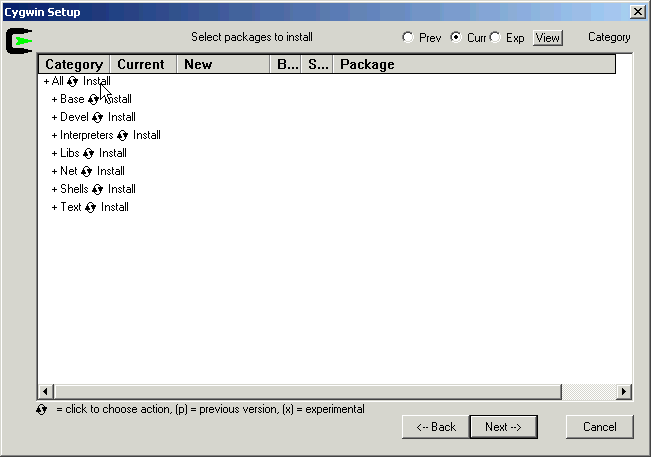
- Select
Next, which will install all the packages. - Select
Create Desktop IconandAdd to Start Menuaccording to your preferences. - Remove the temporary directory where you extracted the files.
-
c:/cygwin/etc/passwdis created during the Cygwin installation. If your Windows account is a domain account and not a local account, then you may need to add an entry toc:/cygwin/etc/passwdby hand.
To do this, start up the Cygwin bash shell with Start ->?Cygwin
Then use themkpasswdcommand to append a line with your login information, for example, I used:mkpasswd -d -u cxh --path-to-home=/cygdrive/c/users >> /etc/passwd
mkpasswd -hwill print out help for themkpasswdcommand - Follow the instructions in the
Set the value of the
PTIIenvironment variable section
Installing Cygwin from the Web
We provide prebuilt downloads of the subset of Cygwin tools needed to recompile Ptolemy II. The Cygwin tools are constantly being updated, for the latest versions, see the Cygwin website.Instructions for installing Cygwin from the Cygwin website can be found on the for Ptolemy II Installation Page
Enabling Copy in Cygwin Bash under XP
You may need to enable copy and paste in the bash shell window.If copy and paste are working properly, then you should be able to highlight text by left clicking and dragging the mouse over the text and then hitting the Enter key to copy the highlighted text.
The Cygwin faq at
http://www.cygwin.com/faq/faq.html#SEC55
says:
How can I copy and paste into Cygwin console windows?More precisely:Under Windows NT, open the properties dialog of the console window. The options contain a toggle button, named "Quick edit mode". It must be ON. Save the properties.
Under Windows 9x, open the properties dialog of the console window. Select the Misc tab. Uncheck Fast Pasting. Check QuickEdit.
You can also bind the insert key to paste from the clipboard by adding the following line to your .inputrc file:
"\e[2~": paste-from-clipboard
- Start up bash by doing Start -> Programs -> Cygwin -> Cygwin Bash Shell.
- Right click on the icon in the upper left of the title bar and select properties
- Under Options, select 'QuickEdit Mode', hit ok
- Select 'Modify shortcut that started this window', hit ok
Cygwin download contents
The download of basic cygwin tools from April, 2003 includes:
_update-info-dir-00160-1
ash-20040127-1		required by cvs
base-files-2.6-1
base-passwd-1.1-1
bash-2.05b-16
binutils-20040312-1
bzip2-1.0.2.5
crypt-1.1-1	required by cvs
cvs-1.11.6-3
cygwin-1.5.9-1
diffutils-2.8.4-1
editrights-1.01-1
fileutils-4.1-2
findutils-4.1.7-4
gawk-3.1.3-4
gdbm-1.8.3-7
grep-2.5-1
groff-1.18.1-2		 required by man
gzip-1.3.5-1
less-381-1
libbz2_1-1.0.2-2	 required by tar
libgdbm-1.8.0.5		 required by cvs
libiconv2-1.9.1-3	 required by sed
libintl1-0.10.40-1
libintl2-0.12.1-3
libncurses5-5.2-1
libncurses6-5.2-8
libncurses7-5.3-1
libreadline4-4.1-2
libreadline5-4.2-2
login-1.9-7		optional
make-3.80-1
man-1.5k-3		optional
minires-0.97-1		Required by openssh
ncurses-5.3-1		Required by readline
openssh-3.up1-1  	Used by cvs
openssl-0.9.7d-3	Required by openssh
pcre-4.1-1		Required by less (pcre = Perl Compatible regex)
readline4-4.1-2
readline5-4.3-5
sed-4.0.9-2
sh-utils-2.0.15-4
tar-1.13.25-5
termcap-20021106-2
terminfo-5.3_20030726-1
texinfo-4.2-4
textutils-2.0.21-1
which-1.5-2
zlib-1.2.1-1
The download of devel cygwin tools from April, 2004, includes all the tools from the basic cygwin download listed above and
autoconf-2.59-1
autoconf-devel-2.59.1
autoconf-stable-2.13-5
binutils-20030307-1
db4.1	                 required by perl
gcc-3.3.1-3
gcc-g++-3.3.1-3		 Matlab interface uses a C++ file
gcc-mingw-core-20031020
gcc-mingw-g++-20031020-1
gcc-mingw-20020817-5
libbz2_1-1.0.2-5	Used by g++?
m4-1.4-1
mingw-runtime-3.2-1
mktemp-1.5-3
perl-5-8.2-1.tar.gz      sadly, autoconf requires perl
pcre-4.5-1
w32api-2.5-1